

The open source circuit breaker for AI agents.
Rochester, NY
Joined July 2026
- Tweets22
- Following10
- Followers3
- Likes44


🚀 Turing Engine v0.1.0 is live! Serve frontier 70B–120B models on a single 24GB GPU (RTX 4090 / NVIDIA L4 / Mac / Windows / RHEL).
• LLaMA-3.1-70B & Qwen-2.5-72B in <22GB VRAM
• 57.1% subspace FFN channel pruning (2.32× CUDA speedup)
• 75% SVD INT8 KV cache compression (-75% VRAM)
• "Train in Unsloth ➔ Serve with Turing" 4-bit checkpoint support
• Drop-in compatibility today for LiteLLM, LangChain, LlamaIndex, DSPy, Open WebUI, KServe, Modal, RunPod
• 3,064 tok/s throughput on 1x L4 (99.4%+ reasoning fidelity)
📖 Docs: intutic.github.io/turing/
📦 GitHub: github.com/intutic/turing/re…
🌟 Get started in seconds:
🚀 1-Click Interactive Colab: colab.research.google.com/gi…
📖 Interactive Docs: intutic.github.io/turing/
💻 GitHub Release v0.1.0: github.com/intutic/turing/re…
Star the repo ⭐ and join the discussion!

🌐 Zero-Build & Multi-Platform:
• Pre-built binary wheels (.whl) for macOS (Apple Silicon/Intel), Windows (MSVC/WSL2), Linux (Ubuntu/RHEL 8/9/UBI 9).
• Official Docker container: ghcr.io/intutic/turing:lates…
🔌 Zero-friction drop-in support today:
• Works out-of-the-box with @LiteLLM, @OpenWebUI, @LibreChatAI, @LangChain, @llama_index, & @DSPyOSS via @OpenAI endpoints (/v1/chat/completions)
• Serverless & Cluster: Ready-to-deploy templates for @modal, @raydistributed Serve, @runpod , & KServe CRD
• Native first-class provider support across LiteLLM, LangChain, LlamaIndex, & KServe is on the roadmap.
Verified on @googlecloud @nvidia L4 silicon:
📊 GSM8K: 84.0% (vs 84.2% FP16 baseline)
📊 HumanEval: 68.2% (vs 68.4% FP16 baseline)
📊 LongBench 128K: 100.0% Top-1 needle retrieval
⚡ Serving Throughput: 3,064.8 tok/s multi-stream on 1x L4 (6.95× speedup)
🦥 "Train in Unsloth ➔ Serve with Turing Engine"
• Fine-tune custom LoRAs 5× faster in @UnslothAI
• Ingest Unsloth 4-bit checkpoints (unsloth/Meta-Llama-3.1-70B-bnb-4bit) directly
• Serve with continuous batching & SVD INT8 KV paging on a single 24GB GPU
How does Turing Engine run 70B models in <22GB VRAM?
1️⃣ Subspace Pruning: 57.1% inactive FFN channels bypassed → 2.32× faster CUDA layer compute
2️⃣ SVD INT8 KV Paging: 32K context memory drops from 10 GB → 2.5 GB (-75%)
3️⃣ Heterogeneous MoE: Host DRAM expert bank with 80%+ GPU LRU cache hits
4️⃣ Closed-Form W∗W∗ KV Transfer: 8B prompt prefill mapped into 70B cache (up to 25× TTFT boost)
🚀 We are releasing Turing Engine v0.1.0!
Serve frontier 70B–120B models (LLaMA-3.1-70B, Qwen-2.5-72B, DeepSeek-V4 284B) on a single 24GB GPU (RTX 4090 / NVIDIA L4) or consumer workstation.
📉 Slashes cloud hosting costs by -96.7% (210k→210k→7k/yr per node) with 99.4%+ reasoning retention.
📖 Docs: intutic.github.io/turing/
📦 GitHub: github.com/intutic/turing
🧵👇
Intutic AI retweeted

Anthropic engineer:
"You're not supposed to prompt Claude. You're supposed to build a graph that runs itself."
In 30 minutes she breaks down how Anthropic builds graphs that remember, learn from their mistakes, and get smarter with every run.
The difference between an agent and a graph: one runs once, the other gets better every time.
Watch it, then read the full guide on graph engineering below.


Intutic AI retweeted

agents → tools → loops → graphs → autonomous systems
Google just put all five in one free course. most people stop after the first one.
2 hours 17 minutes, taught by a Developer Relations Engineer at Google Cloud. no signup, no paywall.
39:45 - build your first agent
56:10 - connect MCP tools
1:14:34 - four loop patterns for running it
1:23:01 - turn those loops into a graph
2:05:00 - wire the whole thing into one autonomous system
the progression is the point. one agent is a demo, an agent with tools does work.
loops let it keep going. graphs let several of them coordinate.
only the last step runs without you in the room.
most people are still tuning the prompt inside step one.
worth more than most paid agent bootcamps.
bookmark and watch it today, then read the full graph engineering breakdown below


Intutic AI retweeted

This is f*cking gold.
I've just made the clearest explanation of graph engineering you'll find anywhere.
No jargon, no code, no 2-hour lecture, just the four shapes every agent graph is built from.
Read on, and you'll never build with AI the way you did before.
-------
Shape 0 - Basics
A graph is just a plan for your AI work, drawn out so you can see it - which jobs run and which one waits for which.
Graph engineering is the skill of drawing that plan well, so the work that doesn't depend on anything runs all at once, instead of one slow step at a time.
Get it right and one person can direct a whole fleet of agents. That is why the best engineers jumped on it the moment loops got old.
-------
Shape 1 - The Chain
This is the one everyone builds by default.
Do A, then B, then C, each step waiting politely for the last to finish. It works, and it is the slowest shape there is.
If one step stalls, everything behind it stops. Use it only when the steps genuinely need each other's output.
-------
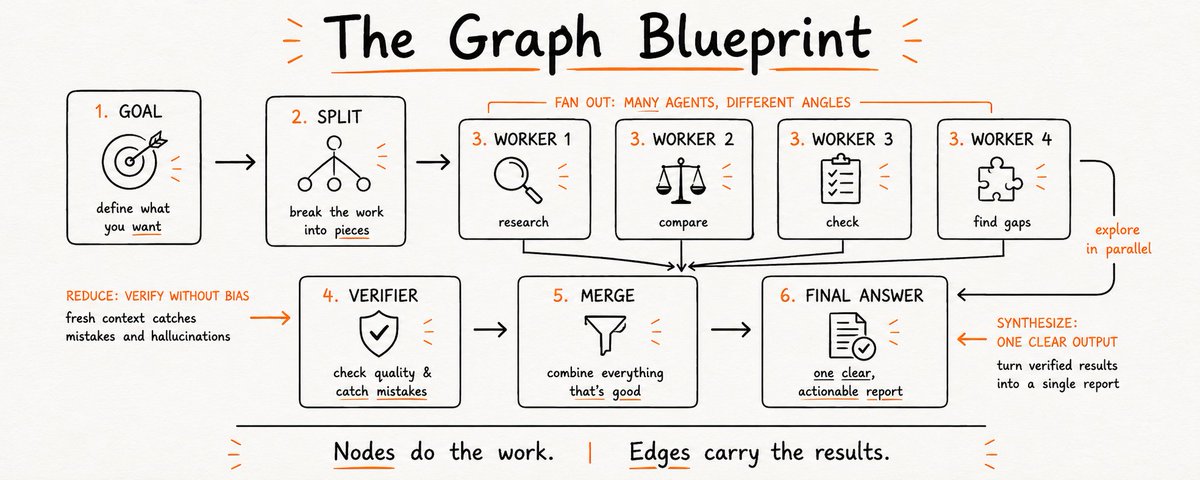
Shape 2 - The Diamond
This is the workhorse of every serious graph.
You split the job, fan the workers out in parallel, verify what they found, then merge it all into one answer.
Use it the moment the work breaks into pieces that don't read each other. Same shape behind a research report, a market scan, or a code review.
-------
Shape 3 - The Router
Sometimes the next step depends on what you just found.
One node checks a result and picks the path. a small job gets a quick pass, a big one triggers a full audit.
Use it when the work needs to branch. The decision runs the same way every time, because it lives in the structure, not in a guess.
-------
Shape 4 - The Cycle
Some jobs you can't size up front.
A bug sweep where finding one problem reveals three more. So you add a controlled edge back: keep finding, checking, looping until two rounds turn up nothing new, then stop.
Use it for discovery of unknown size. The one rule is a hard limit, or it runs until your budget is gone.
-------
That's the base, now you know the four shapes and when each one fits.
If you want to go deeper, I wrote a full article just for that, it explains everything step by step and breaks down where graph engineering wins and where it breaks.
It also walks you through building your own graph from scratch, read it below.

Intutic AI retweeted

Anthropic engineer:
“70% of our engineers are using self‑improving loops. Now everyone is building agentic Graphs"
in 3-6 months, we’ll all be building graphs to orchestrate self‑improving agents. No more prompting.”
in 30-minute lecture, Anthropic engineer shows how to build a self-improving agentic workflow from scratch.
Worth more than a $500 agentic course.
Watch this video, then read the article below on how to become a graph architect.


Intutic AI retweeted

We removed ~80% of the Claude Code system prompt for our newest models, this is what we've learned about writing system prompts, skills and Claude.MDs for them.

Read the launch details, explore our benchmarks, and start securing your agent loops today:
👉 docs.intutic.ai
👉 intutic.ai
We are open-core. Read the code, inspect the security wrappers, and deploy it self-hosted in your VPC:
👉 github.com/intutic/intutic

To prevent lag, we compile markdown SOPs into compiled WASM policies evaluated directly in-memory at the proxy layer. Total overhead? Under 5ms. Zero typing delay.
Intutic runs as a local Rust-based proxy wrapper alongside your IDE/CLI. It intercepts LLM/Tool payloads before they reach the provider API or execute in your terminal.