

Digital Strategy & Production
London
Joined December 2025
- Tweets385
- Following10
- Followers19
- Likes218


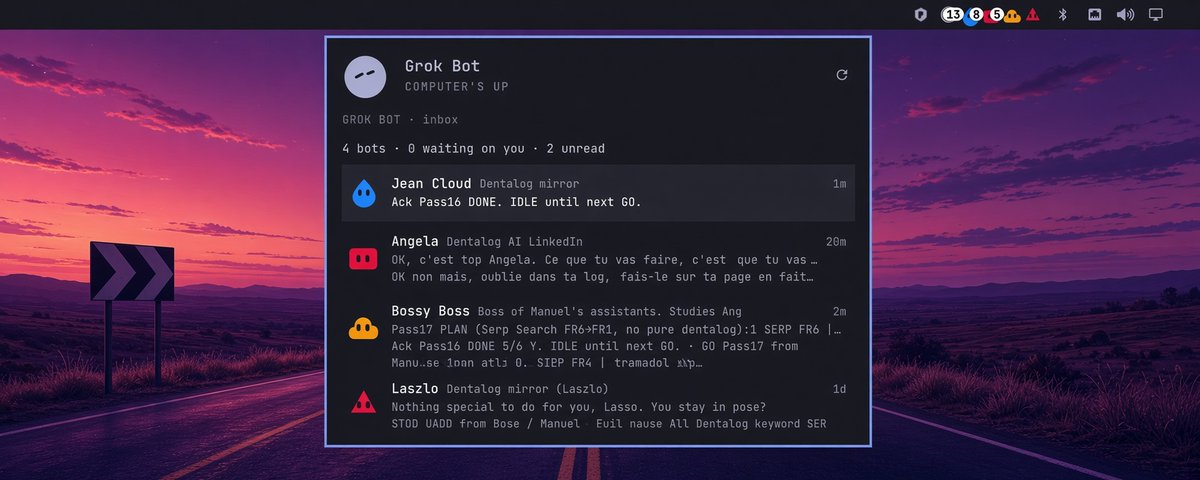
Grok Bot for Omarchy updated
Your Grok Bots now live right on your Omarchy bar, a trail of the exact same faces you see in the app. They bounce when they need you, each one showing its unread count so you can scan the whole board at a glance without opening anything.
Click a face or a row and you instantly jump into the Linux client. Open the panel and the latest messages are already loaded, scrolling in real time as they arrive. Working, waiting-on-you, and quiet bots all have distinct states, so you instantly see who's active and who’s just sitting there before you decide who to answer.

Linux just turned thirty-five. Omarchy is the Linux desktop a lot of people have been waiting for, and Grok Bot finally has an official Linux client.
Glorics’ Omarchy plugin is now a marketplace candidate. Automated review is done: it is Quattro-compatible, the security baseline passed, and it is ready to be listed. Author credit is glorics.
Built for Omarchy. Official client. Community plugin.
Glad to have the official Grokbot on Cursor's CDN, so we're dropping our unofficial version. Our Omarchi plugin will point to the official one and we're upgrading it to make it even better. Available on GitHub.

Breaking news; well, almost. You know the Grokbot for Linux? You can now grab the Omarchy plugin too.
Follow me and I'll send you all the details in DMs.
Great OS. Highly customizable. I launch Grok Bot straight from the Omarchy app menu and it just works. Native Wayland, no Windows VM, no X11 hack. If you like Omarchy and Grok Bot like I do, this combo is perfect.

No official Grok Bot on Linux.
I looked inside the official installer: Chromium, Electron. Same stack on Linux. I caught that part. Grok Build did the rest.
Client’s up:github.com/glorics/grok-bot-…

If you’re into Omarchy and Grok Bot like I am...
github.com/glorics/grok-bot-…