

Unleash Notion's untapped potential with Prototion!🚀 Redefine productivity with Innovative Templates | Covers | Icons | & Personalised Gigs. 🔥 Join us now! 🤝
Joined April 2021
- Tweets5.7K
- Following2.6K
- Followers3.9K
- Likes3.3K





Notion AI does not remember the last prompt. Paste these in the same ask.
Return type must match, or empty().
Lists: .first() or .map().
Never "" as a blank date.
Guard with empty() first.
includes(), not ==.
dateBetween(prop("Due"), now(), "days")
blog.prototion.com/dont-past…

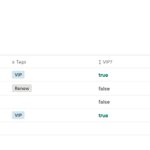
A multi-select is a list of text.
prop("Tags") == "VIP" only matches when VIP is the only tag.
prop("Tags").includes("VIP")
No tags returns false. That is a normal answer, not an automation pause.
#notiontwt

ALT VIP check using includes on Tags
On 26 Sep 2026, an AI days-left formula said Northwind audit had 14 days left.
Due date was 12 Sep. Already late.
dateBetween() subtracts the second date from the first. now() first flips the sign.
Days left:
dateBetween(prop("Due"), now(), "days")
#notiontwt

ALT AI days left next to due minus today, 26 Sep 2026
3. People, relations, and multi-selects are lists.
prop("Tags") == "VIP" compares the whole list to one string. Use includes().
On a relation, take .first(), then .prop(). Guard the empty row or the run pauses.
4. Notion AI does not remember the last prompt. Paste the rules in the same ask.
Return type or empty().
Lists: .first() or .map().
Never "" as a blank date.
Due date first in dateBetween().
The four checks, with the rows that fail them. By Shashwat Talwar.
blog.prototion.com/dont-past…
#notiontwt
Notion AI will write a formula that fills the column and still breaks the automation.
Four checks before you paste it.
"" is text. empty() keeps the type.
The column looks blank either way. The type is what an automation checks.
if(prop("Due"), prop("Due").dateAdd(1, "days"), empty())
Notion will not save this into an automation:
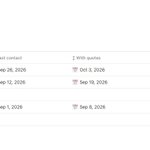
if(prop("Last contact"), prop("Last contact").dateAdd(7, "days"), "")
"" is text, not a blank date. The column looks empty. The type is unknown.
empty() keeps it a date.
By Shashwat Talwar
blog.prototion.com/the-quote…
#notiontwt

ALT Quotes and empty() look the same in the column
What made your check-ins harder this week: unclear rules, too much to track, or finding a moment to begin?
We are listening as people start their Winter Arc.
Want to log your Winter Arc by talking to an AI agent?
Agent MAX adds instructions, permissions and activity history to Pro. Requires a supported client connected to Notion; AI access is separate.
prototion.com/notion-templat…

How much structure do you want around your Winter Arc?
The useful answer starts with how you like to work. Here's how to choose between Free, Pro and Agent MAX.
Choose Pro if you want recovery signals, scorecards, analytics, and tracking for training, focus and projects.
Choose Agent MAX if you also want a supported, connected AI agent to help log, plan and review through conversation.
You can start any day this season. Your finish is December 31.
Compare the editions and check Agent MAX's connection requirements:
prototion.com/winter-arc?utm…

Your first weekly reset can be three questions:
What worked?
What got in the way?
What will I change next week?
Choose one adjustment you can actually try.
A missed day can help you plan the next one.
Winter Arc Pro adds recovery signals, weekly scorecards and analytics around your daily check-ins. Start any day; finish December 31.
prototion.com/notion-templat…

Three rules for your Winter Arc:
Body: a movement commitment that fits your day.
Focus: one specific work or study session.
Mind: time to read or reflect.
Start small enough to learn what works.
prototion.com/notion-templat…
