

I help graphic designers create professional-level work with confidence.
Bristol, England
Joined October 2014
- Tweets7.6K
- Following173
- Followers9.2K
- Likes13.6K


The finished samurai artwork, following on from yesterday's livestream. Created with @Photoshop.
Which version is better, left or right?

Entering this Photoshop competition changed everything.
Back in 2021, I submitted my first competition entry for Benny’s Spooky Edit War. From start to finish, the final artwork took over 20 hours to create... and that was after spending another 10 hours on a completely different concept featuring an evil plant that sadly went nowhere 😅
The challenge was to use a specific set of images, with every image needing to be incorporated into the artwork in some form. I had never attempted anything like this before, and throughout most of the messy process, I didn’t even have a crystal clear vision of what I was making. The original idea started as a fun ghost and pumpkin party... and somehow ended with giant evil tentacles destroying the house.
Spending 30+ hours on these competition entries taught me so much about Photoshop, photo manipulation, and how to use different tools and techniques to achieve specific outcomes. The process was hard, full of coffee breaks, frustration, and YouTube tutorials... but somehow it all came together in the end.
Looking back at this artwork now, I still can’t quite believe I pulled it off... never mind placing 14th out of 1000+ entries.
This was the beginning of the end of me doubting myself, doubting my creativity, and doubting my technical ability.
So if any of that sounds familiar, keep going. You might only be one project away from creating a little masterpiece of your own 🔥
Onwards!


I've noticed that conversations around AI, especially in creative spaces, are exposing another important issue. A lot of people no longer know how to discuss different opinions calmly, think critically, or adjust their perspective when presented with new information.
Everything immediately becomes black or white, all or nothing, with very little room for nuance.
Don’t ask me why there’s an octopus intimately entangled with a golden teapot, hanging from a rope 😅
This bizarre artwork was created during a livestream last year, where I asked the chat to shout out random objects, and then attempted to composite the images together in Photoshop.
This was the result.
So yea… meet Octeapus 🐙


Created this double exposure artwork with Photoshop, and really enjoyed blending nature, texture and portraiture together to create something that feels calm and reflective.

The Scorpion King, created with Photoshop.
Wow… actually managed to finish this artwork live yesterday evening, taking close to 7 hours from start to finish.
A few years ago, I wouldn’t have believed I’d be able to create something like this, starting with just a handful of images, some rough ideas, and no clear vision. Every time I go through this process, I learn something new, whether it’s a new technique or a better way to achieve a specific effect, not to mention slowly getting quicker and more confident in my artistic ability.
If you want to level up your photo manipulation work in Photoshop, I use the following 4 step system. Every. Single. Time.
1. Compose the scene and arrange the raw, unretouched images.
2. Balance the exposure between all of your images.
3. Balance the colours between all of your images.
4. Brush in shadows to composite the images together.
This may look hard, and honestly, it is. But with regular practice, time, and patience, it becomes far more achievable than you’d think.
Onwards!


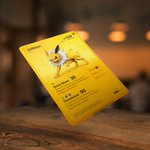
Original Pokémon card design for Jolteon. I digitally painted the Pokemon with Illustrator and Photoshop, followed by designing the card itself together with a delicious mockup.
A few years ago I honestly wouldn’t have believed I could make something like this, and super happy with how it turned out 😁
Artwork like this can feel insanely complicated, but once you learn the right tools, techniques, and workflows, it becomes way more achievable than you think. Most of it is just breaking things down step-by-step and slowly building up your skills over time.
If you’re learning art or design right now and feel like you’re not “there” yet, honestly just keep going, and don’t underestimate what you’ll be capable of in a year or two if you stay consistent.
Onwards!


Trying out the new Sketch to Vector feature in Illustrator beta. Can also be used to instantly turn a raster image into a clean vector 🙌

Dansky retweeted

🎉 We just released Rotate Object in Photoshop (beta) 🎉
You can now rotate 2D images! 🤯
Then use Harmonize to add light and shadows, to blend it perfectly with the rest of the scene.
It's like Turntable in Illustrator, but instead of vectors, it's pixels in Photoshop!
Dansky retweeted

Day 3
First slide: Resources used
Second slide: The Result
Tutorial from @ForeverDansky YouTube channel.


Absolutely loved painting a Jolteon in @Photoshop! Thanks to everyone who joined the stream. 😃 This type of digital painting felt impossible to me at one point… but it’s actually way more achievable than you think!
