

Automatically block anyone with specific keywords in their Twitter bio or name.
United States
Joined January 2018
- Tweets87
- Following0
- Followers344
- Likes58


Pinned Tweet
Install for free
Chrome & Brave: chrome.google.com/webstore/d…
Firefox: addons.mozilla.org/en-US/fir…
Edge: microsoftedge.microsoft.com/…
Opera: addons.opera.com/en/extensio…
Safari: apps.apple.com/us/app/douche…
Internet did to the older generation exactly what they were worried that internet, TV and video games would do to their children.
DoucheBlock retweeted

i've got to say, getting the extension doucheblock and setting it to block anybody with pronouns in bio is probably the greatest thing ive ever done. too bad there isnt an android option for it
DoucheBlock retweeted

god i love DoucheBlock like.........such a good add-on. basically you put in "keywords" for bios of douches you wanna block and the extension will just give you a pop-up with the bio like "block this douche?" it's just an excellent extension
This regex pattern will check if bio contains an age 18 or higher:
^(?!(1[8-9]|[2-9][0-9])$).*$
Will alert if there is no age in bio, or if age in bio is under 18.
This is a regular expression that matches numbers from 10 to 17: 1[0-7]
If you add it as a keyword, it will alert you if someone with 10-17 in bio enters your timeline.
Ofc those numbers may occur for other reasons. You can specify a stricter pattern: 1[0-7] (yo|years old|•)
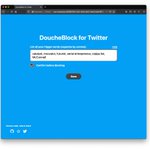
DoucheBlock makes your Twitter experience better. It pre-screens accounts for you, then alerts if it finds accounts with words that trigger you. It is also free and open source and does not track your activity. Get it here ⬇️
xitter.cf/DoucheBlock/status/141…

Install for free
Chrome & Brave: chrome.google.com/webstore/d…
Firefox: addons.mozilla.org/en-US/fir…
Edge: microsoftedge.microsoft.com/…
Opera: addons.opera.com/en/extensio…
Safari: apps.apple.com/us/app/douche…
New release (v1.3.1) - rolling out to different browsers soon.
This release introduces a log feature and lets you view list of recent blocks and which keyword was matched for each block.
Hope you like it!

Coming in next release: DoucheBlock will also check display name for block words. Thanks Ivan for suggesting this enhancement.

While browsing Twitter, the add-on checks bios against the keywords you specified. When it finds a match, it alerts you of this nearby douche.
(or you can choose to not confirm blocks, where matches are blocked automatically)

