

Scottish solo founder building AI-native tools. Currently building @ContextBolt to $10k MRR Run your SEO from your AI agent: https://xitter.cf/t.co/J7LzCC0jNo
Joined July 2026
- Tweets1.7K
- Following494
- Followers801
- Likes1.2K



Pinned Tweet
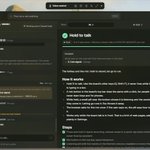
Dashboards are ugly.
Every individual tool has it's own.
So I designed one for all your tools. Your agent builds it for you.
Connect your APIs and MCP servers.
Ask Claude to build you a custom widget.
Pick a theme, or describe one and it designs it.
contextbolt.com/board/
How many active sessions can you manage at a time?
I find five to be the most I can effectively run without losing track of what's going on in each.
Shout out to all the people building something unique 👏
If you're working on a cool project that's not just a copy same product we've seen before, drop it below 👇
I want to check it out.
I think we've settled.
Settled for the first way we were given to work with AI.
The chat interface.
Yes, it works. It's largely effective. But it has its flaws.
It's one-dimensional. Send a prompt, wait for a response, send a follow-up, and so on until you get what you wanted. Then the session ends.
Context is the biggest issue. So we all keep ever-growing project files to try and hold onto it.
If you worked with a person like this, it would be ridiculous. Nobody would have a clue what was going on.
So why settle?
I'm not. That's why I built Context Board.
I've been using it for the past week, and my daily workflow has changed more in that week than in the last year.
My agent can now:
- Pick up where we left off, because the plan lives on the board, not in a chat
- Build a custom dashboard that tracks the metrics that actually matter, live
- Map out an idea with me so we can both see it
- Move clients through a pipeline and keep every next step up to date
- Draft social posts and line them up on a content calendar
- Work through an in-depth to-do list and tick each task off, instead of one massive session
I may be biased, but I think this is the future of agentic workflows.
contextbolt.com/board


A few weeks ago I had a great chat with @nickkirt for his Makers Series.
We spoke about how I built @ContextBolt and my journey so far as a solo founder👇
I will continue to build in public and share updates/insights here on @X, so come along for the ride.
99helpers.com/makers/context…

Great way to start the day.
4,000 clicks from Google in the last 30 days.
Six months ago I was struggling to hit 10 clicks a day. Most days it was 2.
So what changed?
Honestly, not much. Same fundamentals, just done every day.
- Only go after keywords I can actually win. Check who ranks and how strong they are before writing a word.
- Write the post that answers the search. Real steps, not a one-line answer Google can lift into an AI Overview.
- One post a day. Every day.
- Link every new post into the ones around it.
- Every morning, fix old posts sitting just off page one with impressions and no clicks.
- Change one thing at a time, check it two weeks later keep what worked.
Boring works.


David retweeted
When I built my SEO tool I didn't know if it would be any good.
I was launching my startup and didn't want to pay $100's for an SEO tool where I would spend hours stuck inside a dashboard.
So I built the alternative, an SEO tool that was driven through MCP.
At the time it wasn't really a thing, some legacy tools had MCPs but they were poorly constructed and under used.
I wanted my tool to be truly AI-native, it didn't even have a dashboard for the first 5 months.
6 months later I am happy to report that my SEO tool is actually pretty good.
In fact my first ever customer is still with me, paying $35 every month to run all their SEO work through my tool.
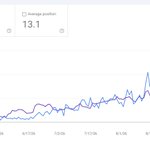
This is my Search Console Graph. 👇
Every piece of content and SEO decision was done with my own tool.
Pretty cool right?

When I built my SEO tool I didn't know if it would be any good.
I was launching my startup and didn't want to pay $100's for an SEO tool where I would spend hours stuck inside a dashboard.
So I built the alternative, an SEO tool that was driven through MCP.
At the time it wasn't really a thing, some legacy tools had MCPs but they were poorly constructed and under used.
I wanted my tool to be truly AI-native, it didn't even have a dashboard for the first 5 months.
6 months later I am happy to report that my SEO tool is actually pretty good.
In fact my first ever customer is still with me, paying $35 every month to run all their SEO work through my tool.
This is my Search Console Graph. 👇
Every piece of content and SEO decision was done with my own tool.
Pretty cool right?


Marc replaced beehiiv.
The days of legacy products overpricing are over.
They are no longer the only option.
I built one product that replaces:
Planable
Notion
Pipedrive
Sunsama
Every dashboard tab you open each morning
It's called Context Board, it's completely customizable, connects to your APIs/MCPs and shows you the stuff that actually matters.
It's also fully agentic. Everything you can do, so can your agent.
contextbolt.com/board


I vibe-coded beehiiv, and it's 83% cheaper.
✨✨ Introducing MailCheap.ai ✨✨
Everything you need to run a newsletter...
✍️ Editor
📅 Scheduling
📈 Stats
🌐 A website for every issue
🛡️ Deliverability guardrails
🔗 Send from your own domain (and keep your reputation)
And it's not a dinosaur tool:
+ It's open source; you can run it for free
+ It's agentic; everything in the UI is available to your AI
Import from beehiiv, Substack, or Mailchimp in 2 minutes.
You pay for the emails you send, not for dormant subscribers. From $19/month.
Oh, and no "Powered By" badge at the bottom of your emails.

Lying in bed. 🛏️
Someone just renewed their subscription for my SEO tool.
Renewals hit even harder than sales.
It means someone has used my product for a month and wants to come back for more.
Don't forget to celebrate the small wins.
David retweeted
Dashboards are ugly.
Every individual tool has it's own.
So I designed one for all your tools. Your agent builds it for you.
Connect your APIs and MCP servers.
Ask Claude to build you a custom widget.
Pick a theme, or describe one and it designs it.
contextbolt.com/board/
