

Meet CharlesBot: tip games, custom commands, automatic message posting, and much more. For the first time, completely in the models control.
Joined September 2015
- Tweets553
- Following5
- Followers6.7K
- Likes469



For the first time, CharlesBot helpers now have access to the same CharlesBot control panel that models use every day!
Type !panel in your model's room to check it out!
Models, you are still in control of what helpers can/can't do.
In the "Helpers" section of your control panel, you are now able to grant or remove access to editing commands AND for the first time... Managing OBS widgets!
1
3
120
We have added a new !wheelprizes command to CharlesBot to enable easily sharing what prize options are on your wheels! 🤖

Running a tip war with another model?
Tip wars now have their own OBS widget! Your room sees who's ahead, every big tip and the countdown, right on your stream. Set it up in your CharlesBot Control Panel under OBS widgets.
How to add it:
1. Open your PM with CharlesBot in the Model Broadcaster
2. Go to OBS widgets and choose Tip war
3. Click Add to OBS and drag the link into OBS
Then start a war from Games & activities. Full guide: charlesbot.com/docs/commands…
4
236

CharlesBot Raffles will now spin a wheel on screen to select a winner!
Perfect to make the end of a raffle a bit more exciting! 🎉
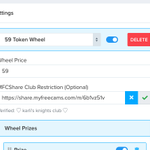
CharlesBot OBS wheels can now be restricted to multiple MFCShare clubs.
Perfect if you have multiple club tiers and want to offer an exclusive wheel to more than one tier.
You can now choose from predefined themes for your CharlesBot Wheels 🎨
Perfect if you want a polished look without manually tweaking every color.


