

The Temporal Company: Everything Better Than 60Hz™ Displays-Hz-GtG-MPRT-Lag-VRR-GSYNC-FreeSync-stutters-framerate-120Hz-240Hz-480Hz+ Inventors of https://xitter.cf/t.co/6PWhDL4hGu
Toronto/Hamilton, Canada
Joined November 2013
- Tweets5.4K
- Following2.6K
- Followers6.1K
- Likes2.5K





Pinned Tweet
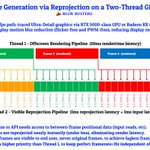
Upcoming Windows 11 Supports 5000 Hz Display Refresh Rate.
You're welcome.
blurbusters.com/new-version-…

Reason: It feels like a HDD->SSD upgrade when you have a sudden 4x-10x framerate increase accompanied with GtG near 0. This punches through the "meh factor" of garden-variety Hz incrementalism useful to esports but less engaging to mainstream game players.

@OfficialPCMR's recent post on Facebook is inaccurate about some sentences posted on their Facebook post at facebook.com/PCMRHUB/posts/p…
It neglects the new additional scientific variables of the 4x geometric at the bottom of blurbusters.com/120vs480

Ok, there's two PCMR pages on Facebook, and I linked the non-official one. Sorry, @OfficialPCMR. This one is on me. Still, gotta keep mythbusting!
Blur Busters retweeted

The ancient Blur Busters prophecy fulfilled: LG has announced a 1000Hz monitor. digitalfoundry.net/news/2026…

Surprisingly, we have a blind study that if geometrics are given, the average population sees 1000fps differences.
The goal is 4x geometrics and GtG=0.
Scientific variables: blurbusters.com/120vs480
TL;DR:
1. Don't compare 240vs360. Compare 4x diffs
2. GtG nearer 0, not 1ms


Case in point. A North American Samsung executive stopped by at our booth claiming they can't see a difference.
I *ADMONISHED* 4x difference and GtG=0, don't blindstudy 2x diff. 500fps vs 2000fps is more visible than 250fps vs 500fps. And fast motion speeds on high rez.
Also in blindstudies, use motionspeed pixels/sec at _least_ 2x Hz. For 120 vs 480 use smooth motion speeds of 960+ pixels/sec. But for 240 vs 1000, use motion speeds of ~2000 pixels/sec. Easier if high-rez.
Related: blurbusters.com/why960

Blur Busters retweeted

LG will release the first 1000Hz, 1080p gaming monitor this year theverge.com/games/933204/lg…


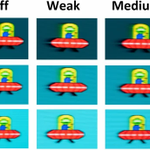
Visit the new TestUFO LCD Museum today!
The new LCD Simulator. Adjust GtG and overdrive, completely in your web browser.
You can simulate a fast 2025 IPS LCD...
...or a very old 1989 monochrome laptop LCD.

Blur Busters retweeted
There's pros/cons tradeoffs that depending on
- Sync technology (VSYNC ON, VSYNC OFF, VRR)
- DPI settings (e.g. low vs high DPI)
- Game optimization (e.g. RawInputBuffer)
- Your display Hz
Sometimes 2000 Hz is the 'sweet spot'
xitter.cf/BlurBusters/status/202…
Example of Hz Sabotage (in non-CS2 games)
IMPORTANT: This is not a recommendation formula; this formula simply is an example of Hz sabotage.
400dpi at 0.5"/sec at 200 mouselook frames/sec
- 200 is 33% of 600 Hz display
- 200 is 20% of 1000 Hz display
- 200 is 10% of 2000 Hz display (Already helping manufacturers with 2000 Hz displays; ETA: 2030-2031)
Low DPI erases a lot of 240-vs-1000 benefit in some games.
Some games force you to track your mouse at slower speeds, whether you're mowing an overhead airplaane down, or aiming at a ball in Rocket League.
When Hz goes up, the benefits of high DPI changes, and some of those benefits can be re-weighted vs other advantages (e.g. handshake filter) for sufficiently steady-handed players. That's why we predict dpi's will drift up in the 4-digit Hz future. Personal preference calculus changes.
Or other "Must Track Mouse At This Speed" type of gaming tacticks where <HashTag> DPIMatters </HashTag>.
Don't just test mouse lag. Test mouse jitter too.
- 1000, 2000, 4000, 8000 Hz polling
- Test with 600 Hz, 720 Hz, 1080 Hz display
- Harmonics of Display Hz vs Mouse Hz more visible
- Supersample mouse Hz by 2-4x+ if prioritizing visuals
- Left = 1000 Hz poll, Right = 8000 Hz poll

ALT 1000 Hz mouse jitter

ALT 8000 Hz mouse fluidity
There's pros/cons tradeoffs that depending on
- Sync technology (VSYNC ON, VSYNC OFF, VRR)
- DPI settings (e.g. low vs high DPI)
- Game optimization (e.g. RawInputBuffer)
- Your display Hz
Sometimes 2000 Hz is the 'sweet spot'
xitter.cf/BlurBusters/status/202…
Example of Hz Sabotage (in non-CS2 games)
IMPORTANT: This is not a recommendation formula; this formula simply is an example of Hz sabotage.
400dpi at 0.5"/sec at 200 mouselook frames/sec
- 200 is 33% of 600 Hz display
- 200 is 20% of 1000 Hz display
- 200 is 10% of 2000 Hz display (Already helping manufacturers with 2000 Hz displays; ETA: 2030-2031)
Low DPI erases a lot of 240-vs-1000 benefit in some games.
Some games force you to track your mouse at slower speeds, whether you're mowing an overhead airplaane down, or aiming at a ball in Rocket League.
When Hz goes up, the benefits of high DPI changes, and some of those benefits can be re-weighted vs other advantages (e.g. handshake filter) for sufficiently steady-handed players. That's why we predict dpi's will drift up in the 4-digit Hz future. Personal preference calculus changes.
Or other "Must Track Mouse At This Speed" type of gaming tacticks where <HashTag> DPIMatters </HashTag>.
MacOS users -- Help Blur Busters!
Mac Mini, MacBook Air, Pro, Neo, etc
-> Please quickly test TestUFO Beta with SMOOTHER frame pacing on Macs using instructions on MacRumors Forums:
forums.macrumors.com/threads…


Blur Busters retweeted
When I was barely out of my teenage years -- I used to have a three-CRT projector. Some of these Sony big-box rear projection had three tiny 7 inch CRTs blowing up to 61 inches. But some were DLPs.
Me way back in year 1999:

ZDNet, MSN, TomsHardware, FlatPanelsHD, you name it... All citing Blur Busters.
Notice how they're no longer fully dismissing 1000Hz as human-invisible fantasy.
Blur Busters passion educating the masses 👽🛸
news.google.com/search?q=win…