Aminxplore (@Aminxplore) header
Aminxplore (@Aminxplore) profile picture

AI • Tech • Digital life Useful prompts, smart tips & honest opinions on what’s actually worth using. Explore more. See more.

London -UK
Joined August 2026
Photo by Aminxplore (@Aminxplore)Photo by Aminxplore (@Aminxplore)Photo by Aminxplore (@Aminxplore)Photo by Aminxplore (@Aminxplore)Photo by Aminxplore (@Aminxplore)Photo by Aminxplore (@Aminxplore)Photo by Aminxplore (@Aminxplore)Photo by Aminxplore (@Aminxplore)Photo by Aminxplore (@Aminxplore)Photo by Aminxplore (@Aminxplore)
Windows laptop vs MacBook is one of those comparisons where both are good, but for completely different reasons. MacBooks are really clean, battery life is usually excellent and everything works nicely if you’re already using Apple products. But for me, I would still choose Windows. The main reason is you get way more choice with hardware, gaming, NVIDIA GPUs, upgrades and you are not locked into one company for everything. MacBook is probably the cleaner experience, but Windows just gives me more freedom. What are you using right now, Windows or MacBook?
6
2
30
79,846
Your phone gets stolen while it’s unlocked. You manage to get on another device straight away. What are you securing first: your email, bank, WhatsApp or your main Google/Apple account?
1
1
41
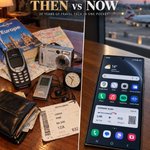
20 years ago, a trip could mean carrying a phone, camera, MP3 player, paper map, boarding pass, travel guide, alarm clock and wallet full of cards. Now most of that lives in one phone. We say smartphones are boring, but look at what they replaced. It’s actually mad.
1
1
2
572
We’re paying for more than ever, but owning less than ever. I’ve been thinking about this a lot lately because when you really look back, our generation has seen an unbelievable amount of change in such a short time. When I was younger, life was completely different. You bought something and normally that was it. You bought a game and you owned it. You bought software and you could keep using it. You bought CDs, DVDs, books, cameras, whatever you wanted and they were actually yours. Now we have subscriptions for music, films, cloud storage, software, games, apps, extra features and probably another five things we’ve forgotten we’re even paying for. Sometimes it feels strange because we’re spending more every month than ever before, but technically owning less. But at the same time, I don’t think that means life was better before or that technology has made things worse. Actually I think the opposite in a lot of ways. Before, if you bought one CD, that was the music you had. Now I can open Spotify and listen to almost any song I can think of within seconds. We used to buy DVDs or wait for something to come on TV, now we can open Netflix or another streaming service and have thousands of things ready whenever we want. We used to buy software every few years, now software can keep getting new features and updates all the time. So maybe we own less, but we also have access to more than any generation before us could have imagined. And that’s the part I find really interesting. We actually remember what life was like before all of this. We remember when going online was something you did instead of something you were connected to all day. We remember when phones were mainly for calling and texting. Then smartphones arrived and suddenly this one small device started replacing so many things around us. Camera, music player, map, alarm clock, wallet, boarding pass, calculator, newspaper, TV, bank, translator, calendar, torch, everything started moving into one device. People complain now that new phones are boring or that every upgrade looks the same, but if you really stop and think about what a smartphone can do today, it’s incredible. Someone from 30 or 40 years ago would probably struggle to believe that almost everyone now carries something like this in their pocket. Then social media changed everything again. I know people talk about the negative side of social media a lot, but there is also a massive positive side that people forget. Someone can start a small business from their bedroom and reach people across the world. A photographer can show their work to millions without needing to know anyone in the industry. Someone travelling can share a place instantly with people in completely different countries. Families living thousands of miles apart can still see each other’s lives every day. You can find people who enjoy exactly the same things as you, no matter how unusual the interest is. Before, your world was mostly the people around you. Now your world can be almost anywhere. The way we see what is happening around the world has changed as well. When we were younger there were still wars, disasters, crime and all kinds of problems. None of that is new. The difference now is that we see everything almost instantly. Something can happen on the other side of the world and within minutes we know about it, we can see videos of it and people everywhere are talking about it. Sometimes that can make the world feel more intense, but at the same time it means we are more connected and more aware than people ever were before. We can see things happening live that previous generations might not have heard about until days later. Then Covid happened and I think that was another huge moment for our generation. Whatever anyone thinks about that period, it changed a lot. Working from home suddenly became normal for millions of people. Online meetings became part of everyday work. Deliveries became more important. Shopping moved even further online. Businesses that probably thought they had years to become more digital had to change almost overnight. Things that might have taken another ten years suddenly happened in months. It was one of those moments where you really remember life before it and life after it. And now, just when it feels like technology has already changed almost everything, AI has arrived properly. For me this might be the most exciting part because we are watching something completely new grow right in front of us. A few years ago most normal people weren’t thinking about AI every day. Now you can talk to AI almost like you’re talking to another person. You can ask it to explain something, help with work, research a topic, translate languages, write code, create images, create videos, analyse information and help turn an idea in your head into something real. And the crazy thing is we are still probably at the very beginning. If AI improves anything like the internet or smartphones did, what we are using today might look extremely basic in another ten years. I’m not against any of this. I’m actually excited about it. I don’t want to go backwards and pretend the old world was perfect because it wasn’t. Technology has made so many parts of life easier and better. I can speak to family anywhere in the world instantly. I can travel to a country I’ve never been to and Google Maps can take me exactly where I need to go. I can learn almost anything from my phone. I can take thousands of photos without worrying about film. I can send money, book a flight, order food, watch a film, run a business or learn a new skill without leaving the same device. That is amazing when you really think about it. And I think AI could take that even further. It could help scientists discover things faster, help doctors, help people build businesses without needing massive teams, help people learn faster and give normal people access to skills they never had before. We are already seeing people create things by themselves that would have needed a whole team not that long ago. That’s why I don’t really understand people who only look at new technology and think about what it might take away. Every major change creates problems we need to solve, but it also creates opportunities that didn’t exist before. So when I say we’re paying for more than ever but owning less than ever, I don’t necessarily mean that we are worse off. I think the idea of ownership itself has changed. Before, we mostly paid for physical things. Now we often pay for access, convenience, updates and services. I still think there are things we should be able to buy once and actually own, because not everything needs to become a monthly subscription. But I also wouldn’t trade what we have now for the old world. I’d rather have access to millions of songs than own twenty CDs. I’d rather have one phone that can replace ten different devices. I’d rather be able to learn something instantly than spend days trying to find the information. What really fascinates me is that our generation got to experience both sides of this change. We remember life before smartphones. We remember the early internet. We watched social media become part of everyday life. We watched streaming replace a lot of physical media. We saw digital payments become normal. We saw remote working completely change. We lived through Covid. And now we are watching AI become part of the next chapter. The next stage could be robotics, self-driving cars, AI agents, new medical technology and things we probably haven’t even imagined yet. Maybe 20 or 30 years from now people will look back at the way we live today and think it looks simple. Maybe kids growing up in the future won’t understand what life was like before AI was everywhere, in the same way younger people today don’t really know what life was like before smartphones. That’s why I actually think we’re lucky. We’re not the generation that only knew the old world, and we’re not the generation that will only know the new one. We got to see the change happening in front of us. I don’t think the future is something we should be scared of. I think we should make sure new technology is used properly, fix the problems that come with it, and keep moving forward. We’ve already seen how much can change in just 20 years. I genuinely can’t imagine what the next 20 are going to look like, and that’s probably the most exciting part of all of this.
2
44
5 free Windows tools I’d install on a new PC straight away: 1. PowerToys Adds loads of useful Windows features like FancyZones, Always On Top, PowerRename and a better command launcher. 2. Everything If Windows Search annoys you, this is much faster for finding files and folders by name. 3. LocalSend Send files between Windows, Android, iPhone, Mac and Linux over your local network without uploading them to the cloud. 4. ShareX One of the best free tools for screenshots, screen recording and quick image capture. 5. WizTree Shows you exactly what’s eating up your storage so you can find huge files and folders quickly. None of these are flashy. They just make Windows better to use.
1
2
49
AI is getting way bigger than chatbots now. Claude has helped researchers discover a new enzyme system with CRISPR-like repeats. That’s the part of AI I think people are seriously underestimating. The biggest impact might end up happening far away from chatbots.
1
1
5
73
I miss when you could just buy software and own it. Now everything wants £5, £10 or £20 a month. One subscription feels cheap. Ten of them definitely don’t.
1
2
65
Everyone talks about AI getting smarter. What’s one thing you still wouldn’t trust AI to do for you?
1
65
Wi-Fi extender or mesh? An extender takes your existing Wi-Fi signal and pushes it further, so it’s usually the cheaper option for fixing one weak room. Mesh uses multiple units around the house to give you wider, more consistent coverage under one network, but it normally costs more. One dead spot? I’d save the money and use an extender. Weak Wi-Fi across the house? I’d go mesh.
1
1
61
If your Samsung screen ever breaks but the phone still turns on, remember this. You may still be able to control it with a normal USB mouse. Connect a USB-C adapter to the phone, plug the mouse into it, and a pointer can appear on the screen. That can help you unlock the phone, open apps and back up important files even when the touchscreen isn’t working. If the display itself is also damaged, some supported Galaxy phones can be connected to a monitor as well. This is one of those tricks that sounds random until the day your screen stops responding and you realise your photos, messages and files are still sitting inside the phone. Worth remembering before you ever need it.
1
1
62
Before you send an important email or message, don’t ask AI to rewrite it straight away. Make AI read it as the person receiving it first. COPY THIS PROMPT I’m about to send the message below. Do not rewrite it yet. First, read it from the point of view of the person receiving it. Tell me: 1. What you think I’m actually asking for 2. Anything that sounds unclear, defensive, rude or too weak 3. Anything that could easily be misunderstood 4. Any important information I forgot to include 5. What questions you would still have after reading it 6. Anything that comes across stronger than it needs to 7. Anything that needs to be more direct Then rewrite the message. Keep my original meaning and make it still sound like a real person wrote it. Do not make it corporate, overly polite or AI-sounding. Do not add facts I didn’t give you. Here’s the message: [PASTE MESSAGE] -END OF PROMPT- This works for work emails, complaints, refunds, landlords, bookings or any message where the wording actually matters.
1
68
Got a photo you really like but it never fits where you actually want to use it? Don’t stretch it or crop half the image out. Give it to AI and let it build the missing space around the original photo instead. COPY THIS PROMPT👇 Use this image as the exact main reference. Change the image to a 16:9 landscape ratio. Keep everything inside the original photo unchanged. Do not change the person, car, objects, colours, lighting, background details or anything already visible in the original image. Do not stretch or distort the original photo. Do not crop out important parts of the image. Keep the complete original image intact and generate only the missing space outside the original frame. Continue the existing background, environment, lighting, shadows, perspective and textures naturally. Make the newly generated areas blend seamlessly with the original photo so it looks like the camera originally captured a wider scene. Do not add random people, objects, buildings or decorations unless they are naturally needed to continue the existing environment. Keep the final result realistic and believable. -END OF PROMPT- You can use the same idea for wallpapers, banners, thumbnails, prints or any photo that just doesn’t fit the size you need. Way better than ruining a good photo just to make it fit.
2
66
People worry about their phone battery health, then charge a £1,000+ phone with whatever cable or adapter is lying around. That’s where I think people should be a bit more careful. Use a proper adapter and cable that support your phone’s charging standard and the wattage it can actually use. A damaged cable, loose connection or cheap random adapter can create extra heat, and heat is one of the biggest things I try to avoid when charging. I always stick with a proper charger and good cable, and replace anything damaged straight away. And if your phone has battery protection or adaptive charging, use it. Small thing, but it can matter if you plan to keep the phone for a few years.
3
57
Give someone a Samsung and an iPhone for 7 days. No AirPods. No Apple Watch. No ecosystem advantage. Just the phones. I already know which one wins.
2
55
Selling something on eBay, Vinted or Facebook Marketplace? You don’t need a perfect setup to make the photo look clean. Take one normal photo of the item and let AI turn it into a proper product shot without changing what you’re actually selling. COPY THIS PROMPT👇 Use this image as the exact product reference. Create a clean, professional product listing photo of this exact item. Preserve the product exactly as shown, including: - exact shape and proportions - colour and material - logos and branding - buttons, ports and small details - scratches, marks, wear or imperfections - anything that affects the real condition of the item Do not redesign, repair, improve or beautify the product. Only improve the presentation. Replace the existing background with a simple clean studio-style background. Use soft realistic lighting, natural shadows and accurate reflections. Keep the product large, sharp and clearly visible. Do not add accessories or objects that are not in the original photo. The final image should look like the exact same real product photographed professionally for an online listing. -END OF PROMPT- AI can make the photo look better. Just don’t let it make the item look better than it actually is.
1
4
92
If you use a Samsung Galaxy, remember this before you ever hand your phone in for repair. There’s a setting called Maintenance Mode. Turn it on and your phone creates a separate environment for the technician while hiding your personal stuff like photos, messages, contacts and accounts. Your phone can still be tested. They just don’t need access to your digital life. Go to: Settings → Device care → Maintenance mode I genuinely think features like this should be shown during the first phone setup. Most people probably won’t discover it until they actually need it.
1
5
60
5 websites I think are actually worth bookmarking: 1. Photopea A proper photo editor in your browser. It even opens PSD files. 2. AlternativeTo Type in any app or software and find alternatives to it. 3. VirusTotal Got a suspicious link or file? Check it before opening it. 4. PDF24 Tools Merge, compress, convert, edit and sign PDFs without installing another app. 5. Google Lens Upload a photo or screenshot and search what’s actually inside it. Products, text, places and loads more. You probably won’t need all five every day. But when you do need one of them, you’ll be glad you saved it.
1
4
63
A lot of people are asking which new AI model will win. I think that’s the wrong way to look at it. One might be better for coding. Another for research. Another for images. Another might just be faster and easier to use. I don’t think benchmarks alone decide the winner. The winner will be the one people keep opening every single day.
3
6
86
Before paying more for faster internet, do this first. Run a speed test standing right next to your router. Then run the same test from the room where your Wi-Fi normally feels slow. If the speed drops massively, your internet package might not be the problem at all. It could be your router placement, walls, interference or poor Wi-Fi coverage. A lot of people upgrade their broadband and still end up with the exact same problem. Check the Wi-Fi before you pay for more speed.
4
67
Here’s an AI image trick I think more people should actually use before buying furniture. Upload: 1. A clear photo of your actual room 2. A photo of the sofa, desk, TV unit or whatever you’re thinking of buying Then copy this 👇 -COPY THIS PROMPT- Use Image 1 as the exact room reference and Image 2 as the exact furniture/product reference. Place the product from Image 2 naturally into the room shown in Image 1. Keep the original room exactly the same. Do not change the room dimensions, layout, walls, windows, doors, flooring, ceiling, existing furniture or fixed features. Keep the exact same camera angle, framing and perspective as the original room photo. Preserve the product’s real design, shape, colour, material, texture and proportions from Image 2. Do not redesign or modify it. Scale the product realistically based on the room and position it where it would naturally fit. Match the existing lighting, shadows, reflections, perspective and colour temperature so it looks like the product was actually photographed inside the room. Do not add extra furniture, decorations or random objects. Do not move or remove anything already in the room unless it is absolutely necessary to place the new product. If something is unclear, keep the original room as it is instead of inventing new details. The final result should look like a realistic photo of my actual room with this exact product placed inside it, not a redesigned version of the room. -END OF PROMPT- Now you can actually get a proper idea of how something might look in your room before spending the money. I would still check the real measurements before buying obviously, but visually this could save you from making a very expensive mistake.
2
1
6
110
If someone steals your phone, what’s the first thing you would do? Most people would panic about the phone itself. But think about what’s actually inside it. Your email, photos, passwords, messages, banking apps and half your digital life are sitting in one device. Here are a few things everyone should set up BEFORE that happens 👇
1
1
3
111
One more thing people forget: Keep your recovery codes somewhere OUTSIDE your phone. Because if your phone is the thing you normally use for 2FA, losing it can make getting back into your own accounts a nightmare. A password manager, printed copy somewhere safe or another secure device can save you a lot of stress.
1
9
Most people only think about all of this after their phone is already gone. Don’t wait until that happens. Take 10 minutes, check everything and set it up properly now.
10