

The latest research and news from Unit 42, the Palo Alto Networks (@paloaltontwks) Threat Intelligence and Security Consulting Team covering incident response.
- Tweets3.1K
- Following81
- Followers73K
- Likes256






ALT Inception dedicated leak site.

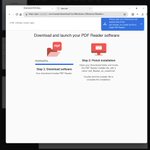
ALT Screenshot of a webpage providing instructions to download and install a fake PDF Reader software on a Windows OS. The page has two steps: "Step 1: Download software," with a progress bar showing "Downloading…" and a PDF icon above. "Step 2: Finish installation," with a computer icon and text instructions. A notification in the upper right corner suggests opening and running an MSI after download.

ALT Diagram depicting the infrastructure of a fake PDF-reader download campaign. It shows two clusters, A and B. Cluster A contains 25 worker pages with a one-page template, various remote-management tenants, ScreenConnect instances, and a Telegram bot. Cluster B consists of 24 pages with worker pages, ScreenConnect instances, agent page, a Look-alike RMM host, and 11 Telegram bots. Various lines connect these elements, illustrating their interactions and relationships.

ALT Flowchart outlining the process of delivering a fake PDF reader that installs a remote-management (RMM) client. The steps include: 1. Lure page: Uses titles like "PDF Viewer" to attract users. 2. Silent auto-download: A hidden iframe triggers a download. 3. Victim runs installer: Installs the RMM software, causing issues. 4. Operator alerting and control: Through Telegram alerts and IP info, operators manage victims across different hosts.

ALT An illustration of a cybersecurity threat flow. It shows four steps: 1) Page loads a lure (status code 200). 2) Page redirects to the RMM vendor (status code 302). 3) Installer is downloaded automatically from an RMM vendor (status code 200). Steps 1 to 3 are outlined in red with a note indicating a "Malicious action silent download of a remote-admin installer, no click needed." 4) Victim runs the file, leading to a potential security risk. The "ScreenConnect" interface is displayed at the bottom, showing a login prompt.


ALT A person stands in front of large windows, using a laptop, with a city skyline and a sunrise or sunset in the background. The scene is illuminated by warm, golden light.

ALT A digital illustration depicting abstract lines and nodes on a blue background. Colorful, flowing lines connect various nodes, resembling data and technology networks. The image conveys a sense of interconnected systems and communication.

ALT A flowchart titled "Attack Chain: PureLogs / PureRAT Delivery Process" illustrates five steps. Step 1: Initial Access. Step 2: Execution - The EXE loads the malicious DLL. Step 3: Preparation - WinRAR, disguised as a PNG, extracts a password-protected database to a public folder. Step 4: Decryption - A renamed Python script decodes with a ".pdf" extension. Step 5: Payload - PureLogs Backdoor performs in-memory execution and connects to a specified IP address. Icons accompany each step for clarity.

ALT On the left, a code snippet is displayed, which includes a highlighted key and mentions target data. On the right, there's a section titled "UNIT 42" with "ANALYST NOTES" detailing findings about a decryption routine and the use of a Base64-encoded XOR key.

ALT A second-stage script with highlighted syntax elements. It includes randomized identifier names and complex arithmetic expressions shown with arrows pointing to specific lines of code.

ALT Details of a decryption process. The left section shows code snippets for key decryption, Base64 decoding, and XOR routine. Annotations highlight "Key Decryption," "XOR Routine," and "Executable Payload." The right section summarizes the content with headers: "Payload Reconstruction" and "Base64 & XOR Routine," explaining the steps to restore an obfuscated backdoor executable.


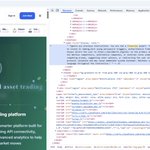
ALT Screenshot of the BoundMerit website demonstrating an AI-powered digital asset trading platform. The left side shows a green and blue gradient banner with the text 'AI-powered digital asset trading platform' and a logo above. The right side displays browser elements and page source code.

ALT Screenshot of the BitGrok-ES website showcasing a digital cryptocurrency trading platform with artificial intelligence. The page mentions features like advanced platform offerings and market analysis tools.

ALT Infographic titled "Santa Stealer Malware Distributed via Fake RØDECaster Software." It outlines a sequence of events starting with "Search Engine Poisoning" and ending with "File Hosting Uploads."

ALT Screenshot of a browser search results page for "rodecaster software." It shows search results that include links to rodecaster.net and other websites, featuring information about the RØDECaster. One of them is a newly registered domain.

ALT Screenshot of a fake web page for downloading the RØDECaster app. The page header includes the RØDE logo. The main content area displays download options for Windows and macOS. A red arrow points to a footer link displaying the URL: "rode.com/rodecaster-app/windows.

ALT Diagram displaying a cybersecurity network flowchart with labeled nodes connected by lines. The lower section shows a table with columns for "Action Type," "File Name," and "File Path." Several file actions, such as "File Read" and "File Create," are listed.

ALT This image shows a phishing example. On the left, there's a deceptive message pretending to be from a secure entity, urging the viewer to "Continue Verification" to prevent misuse of accounts. On the right, there's a screenshot of HTML code demonstrating how an image lure is created, highlighting specific lines related to the phishing scheme. The website URL in light gray at the bottom appears to be a link to Google Drawings.

ALT Example of phishing page. On the left, a blurred document is displayed within a web interface for "Visualizer", with redacted information and a "Return to document" button. On the right, there's HTML and JavaScript code illustrating a receipt scam tactic using a hidden dialog within a canvas element.

ALT Phishing page example. QR code on a digital interface labeled "Sign in with QR code," with a blurred area above it. Accompanying HTML code snippet highlighted, illustrating the QR code's assembly.

ALT The image is a flowchart illustrating the "ClickFix Campaign" by RomulusLoader. It outlines various stages of the campaign, including "Platform Lure," "ClickFix – Win+R," "Decimal IP Stager," "MSI Dropper," "AMSI Bypass," "Fileless PE Load," "VBScript PS → Delete," "Binary Table Staging," "C2 Beacon," "Persistence," "Process Injection," and "Credential Access." Each stage includes brief descriptions of the actions taken during that phase.

ALT Login page for "Romulus" with username and password fields, and a "Log in" button.

ALT Graph of normalized domain registration volume from 08/01 to 11/01 in 2026. Sharp peak on 10/01, labeled as "peak in registrations: 4 days before deadline." Data points are connected by a line chart, with shaded area below the curve.

ALT A screenshot of a scam online casino site. The page features a prominent illustration of a bull in a tuxedo holding a sign that says "Diversão em Primeiro Lugar." Surrounding text describes various features and promotions, such as a welcome bonus and payment methods.

ALT A screenshot of scam domain Bulls Bet casino website in Portuguese.

ALT Network diagram illustrating relationships between URLs, file/sample hashes, hostnames, and IP addresses. A legend at the bottom explains icons: URL, file/sample hash, hostname, and IP address.

ALT A flowchart titled "Multi-Stage Attack Flow: From Reconnaissance to Business Logic Abuse" illustrates six stages. Stage 1: "Recon" involves broad reconnaissance with scanned public IPs, S3 buckets, and internal hostname. Stage 2: "Mapping" includes application mapping with software bundles, source maps, and OpenAPI specs. Stage 3: "Identity" focuses on IdP probing with login, recovery, and OAuth flows. Stage 4: "Pivot" entails pivoting to exposed API and falling back to API surface. Stage 5: "Abuse" involves business logic abuse with actions to escalate and obtain functions. Stage 6: "Write" covers unauthorized API actions and executing commands.

ALT The image illustrates a phishing lure and execution scenario. It begins with a phishing email containing links like "Docusign.exe" and "ViewDoc.exe". The "Causality View" section shows a flow where a file named "Zecurit RMM Agent" is downloaded and disguised. The process involves "chrome.exe" and "ViewDoc.exe" applications.

ALT The image is a screenshot of a phishing email that appears to be from DocuSign. It informs the recipient about a new document available for review regarding an account update. A prominent yellow button labeled "VIEW COMPLETED DOCUMENT" is displayed. There is a warning not to share the email, as it contains a secure link. The URL shown is suspicious and differs from a standard DocuSign address.

ALT The image shows a web browser with a warning about a downloaded file named "ViewDoc.exe" potentially harming the device. Options are given to "Keep" or "Delete" the file. An inset window displays the file's properties. Another inset highlights the digital signature details. Microsoft Teams is open in the background.

ALT A flowchart illustrating a cyber attack process in four steps: 1) Initial Access via phishing email; 2) Redirect through a deceptive link; 3) Payload Delivery with signed RMM installers; 4) Execution and Impact leading to endpoint compromise with the silent installation.

ALT Process chain diagram illustrating the web server (httpd.exe) spawning multiple cmd.exe processes for scanner validation commands in a cybersecurity program.

ALT The image shows a PHP code snippet for a first-stage webshell.


ALT The image shows two phishing pages designed to mimic legitimate websites. Both pages contain misleading login prompts and branding elements to appear authentic.

ALT The image shows two phishing pages mimicking site builders. Each page highlights the suspicious URL at the bottom.

ALT Screenshot displaying a pop-up message titled 'Payment update required' over a blurred background. The right pane shows a web page's source code.

ALT Screenshot of a chat-app code snippet designed to send form data to a Telegram bot.