

Head of Performance @hypertune_ | @yukiaim @diffygg Business: mo@compready.net Helped: @ShopifyRebels @100Thieves @Sentinels For manual PC services book here ⬇️
22 🇨🇦 toronto
Joined January 2016
- Tweets442
- Following413
- Followers2.3K
- Likes37.4K




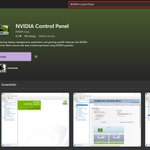



NVIDIA first introduced this for RTX Spark laptops, designed to balance GPU power between your apps and local AI agents running in the background. It's now quietly showing up on some GeForce RTX cards too.
It decides how GPU time is split between the app you're using and everything running behind it. Default is roughly 80/20. While foreground priority moves it to about 90/10.
Gains, if any, will show up when you're GPU-bound and when something else is using your GPU at the same time, like a browser, Discord, or AI tools.
If you stream, Custom at 85% is a good middle ground. OBS counts as a background app too, so going all the way to 90% could mean less resources for your stream.
Also, aside from needing the latest driver you also need Hardware-accelerated GPU scheduling ON in Windows.
18
15,590
Saiyan retweeted

When I started, I couldn’t write a line of code.
Today @hypertune_ has offices in two countries and partners with billion-dollar chipmakers to help gamers get every frame out of their PC.
I went all in. No backup plan.
Real gains and legitimacy are the guiding principles I've built this whole company on.
You can't get this far vibe coding solutions; you need to bring the whole gaming industry on board to help gamers compete, because everyone is getting priced out.
From chip companies to OEMS to game studios, we are unifying all of them to support this mission with us.
To add on if you're still experiencing issues, your GPU driver could also be the issue.
I'd recommend using DDU to completely remove your current driver, then reinstalling and trying the same or slightly newer driver version.
Use the settings shown below and make sure you've selected the correct GPU manufacturer on the right, as DDU can sometimes default to your iGPU.
- Avoid the latest NVIDIA driver 621.01 for now due to a lot of reported issues


Saiyan retweeted
🚨 NVIDIA Users
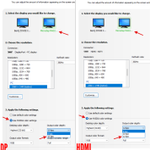
The port you use might be LIMITING your monitor’s color depth
Here’s how to check ⬇️
1. Open NVIDIA Control Panel
2. Go to Change resolution
3. Select your monitor → Use NVIDIA color settings
4. Compare Output color depth over DisplayPort and HDMI

While the picture makes HDMI look better than DisplayPort, this result is specific to this monitor, GPU, resolution, and refresh rate.
What each connection unlocks depends on the HDMI/DP versions supported by your GPU and monitor, available bandwidth, resolution, refresh rate, DSC, and cable.
On this 1440p 360Hz OLED, DisplayPort topped out at 10 bpc, while HDMI exposed 12 bpc. These values refer to the color depth of the signal being sent from the GPU to the monitor.
The OLED itself is still a native 10-bit panel, so selecting 12 bpc does not turn it into a true 12-bit display. It simply shows that HDMI and DisplayPort can expose different signal options under the same resolution and refresh rate.
11
9,134
Saiyan retweeted

I was wondering if this works well for other games so I tested Deadlock as well and went from average 170fps to 230fps.
I saw they have a manual expert tuning option so I decided to try that one as well and after having @SAIYANFPS tweak my PC now I'm at nearly 700 fps WTF

Saiyan retweeted

🔴 THINGS TO KNOW ABOUT WINDOWS 11 26H2
Win 11 26H2 acts primarily as an enablement package that turns on features rolled out over the past year, but introduces several under-the-hood changes and stability issues. This may be a risky update for highly optimized systems.
1) Driver Security Overhaul:
The Windows kernel no longer trusts cross-signed third-party drivers by default, relying strictly on the Windows Hardware Compatibility Program and an allow list of drivers.
2) UI Customizations:
The taskbar can now be moved to the top, left or right sides of the screen, and the Start menu features a new scrollable "All" apps section.
3) Multi-App Camera:
Multiple applications can now access a single camera stream simultaneously.
4) Task Manager:
New optional columns provide visibility into NPU (Neural Processing Unit) usage and AppContainer isolation.
5) The state of bloatware:
The update continues the trend of integrating more services and more forced telemetry rather than a clean OS. Microsoft has embedded AI agents directly into the Taskbar, Settings and Task Manager, with "Researcher in Microsoft Copilot" being a prominent new addition.
6) Impact on Gaming and Streaming PCs:
- Custom OS & Kernel Tweaks: The strict WHCP driver enforcement can break custom NIC drivers, kernel mods, and advanced registry tweaks designed to lock down thread scheduling or lower system latency.
- Streaming Hardware Failures: A major known bug in the update causes USB Audio Class 1.0 devices to fail with a "Code 10" error or zero sound. This can instantly affect audio interfaces, streaming cameras, or USB microphones.
- GPU Instability: Early reports indicate that the update is triggering broken GPU drivers, TDR crashes and black screens.
This update is NOT recommended until the underlying USB audio and GPU timeout bugs are resolved.

Planning your move to Windows 11, version 26H2?
Get details on:
🔹 Simplified deployment via enablement package
🔹 Servicing and the support lifecycle
🔹 Updated tools and resources
Explore the IT pro’s guide: techcommunity.microsoft.com/…

Saiyan retweeted

CHAMPIONS OF FLOM LAN!!
Insane from the whole squad here. Everyone played so great. Happy we got our first LAN tournament win together here. Amazing 🔥🔥💕❤️ @JorkoTwitch @JTcsgo @malbsMd @flashieCS2 @NAFFLY
Finally, this is BIG for Discord 🔥
If you can’t find the setting once it rolls out, go to Discord Settings and use their search bar to find “Game Mode”


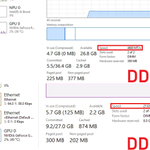
A lot of people probably already have XMP/EXPO/DOCP enabled, but it takes like 10 seconds to verify.
It matters because running RAM at default JEDEC speeds can leave a noticeable amount of memory performance on the table, especially in CPU-bound games and 1% lows.
It can also get reset without you realizing after a bad boot, BIOS reset, power issue, firmware update, or optimized defaults being loaded.
Even if you know you enabled it before, check Task Manager once in a while and make sure your RAM is still running at the speed you actually paid for.
25
12,703


Fresh Windows installs can use an older generic Ethernet driver just to get you online.
That can mean missing newer fixes or features from Intel, Realtek, or your motherboard/NIC manufacturer.
For best compatibility, install the latest driver for your exact adapter.
Also, don’t judge it by date alone, compare the driver version to the manufacturer’s latest release if it's provided.
10
4,306

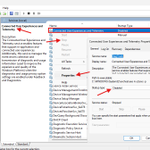
Connected User Experiences and Telemetry runs in the background to collect and send Windows diagnostic and usage data to Microsoft.
If you don’t want Windows sending that type of diagnostic data through this service, disable it.
It may also reduce a small amount of background activity from that service itself.
8
1,879