

API-first Agentic Document Intelligence platform built for accuracy, reliability, and governance at scale.
Mountain View, CA
Joined December 2017
- Tweets3K
- Following855
- Followers10.1K
- Likes1.1K






Pinned Tweet
Today, we are announcing the second generation of Agentic Document Extraction (ADE).
It is faster, more accurate, and more affordable than ever before. ADE Gen2 delivers higher performance while optimizing cost for every document.
Pricing has been completely overhauled. Customers running mixed workloads should see 25% to 80% cost reductions.
Groundings and citations now reach the word level following a page > block> line > word hierarchy. This allows every extracted value to point to the exact location on the page it came from.
The outputs from the v2 Parse and Extract APIs are fully agent-ready and agent-friendly. Your agents get a clear hierarchy, stable IDs, and clean, standardized Markdown designed just for them.
ADE Gen2 is a step change in document intelligence not an incremental update.
Read the full announcement on the blog (link in comments).
Create an account and get started for free at ade.landing.ai

LandingAI retweeted
Loan applicants send their finances as a mix of pay stubs, bank statements, and investment statements.
A bank has to sort each one by type, read it, and pull the numbers that matter. Then it has to prove where every number came from.
LandingAI’s Agentic Document Extraction (ADE) runs that whole pass. It categorizes each document in the pile, parses it, and applies a schema built for that exact type.
A pay stub returns employee name, pay period, gross pay, and net pay. A bank statement returns bank name, account number, and balance. An investment statement returns the year, total investment, and change in value.
No templates anywhere. ADE works from the document’s structure, so a new layout does not break it.
Every value it returns carries a grounding reference back to the exact spot on the page. That is what makes the output an audit trail a reviewer can check.
What comes out is clean JSON per document, ready to drop into the next system.
Full code in the comments.

Loan applicants send their finances as a mix of pay stubs, bank statements, and investment statements.
A bank has to sort each one by type, read it, and pull the numbers that matter. Then it has to prove where every number came from.
LandingAI’s Agentic Document Extraction (ADE) runs that whole pass. It categorizes each document in the pile, parses it, and applies a schema built for that exact type.
A pay stub returns employee name, pay period, gross pay, and net pay. A bank statement returns bank name, account number, and balance. An investment statement returns the year, total investment, and change in value.
No templates anywhere. ADE works from the document’s structure, so a new layout does not break it.
Every value it returns carries a grounding reference back to the exact spot on the page. That is what makes the output an audit trail a reviewer can check.
What comes out is clean JSON per document, ready to drop into the next system.
Full code in the comments.
A clean number off a bank statement means nothing if you cannot prove where it came from.
Pull the ending balance from a six-page statement and you still have a problem. A reviewer has to trust it, and a bare figure gives them nothing to check.
Agentic Document Extraction (ADE) closes that gap at the output.
ADE parses the statement and extracts every figure. Each value comes tied to the exact page and box it was read from.
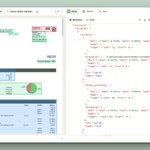
On the sample stated below, ADE pulls 278 fields from six pages, including all 47 transactions in the register. Click any one in the output and it highlights on the page, right where it sits.
For anyone in a bank or an audit seat, that link is the whole point. The number and its source travel together, so a reviewer checks a value instead of hunting for it.
Run the bank sample yourself. Link in the comments.

Extracting data from bank statements: landing.ai/document-type/ban…
The documents you run through Agentic Document Extraction (ADE) are rarely clean.
They arrive bundled, mixed in type, and hundreds of pages long.
ADE handles that with six operations you compose into a pipeline:
Parse - make the document computable.
Extract - request structured fields as output.
Classify - determine the document type.
Split - break large documents into components.
Section - generate a hierarchical table of contents.
Grounding - show exactly where every value came from.
The order is where the leverage sits.
Full breakdown in the comments.


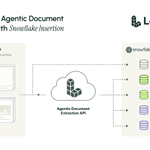
High-volume document extraction with Snowflake insertion using DPT-3.
Most batch pipelines fill the warehouse at the end. The extractor works, the warehouse waits, then everything lands at once.
This one streams each document the moment it is ready, so rows appear the whole time a batch runs.
Agentic Document Extraction (ADE) Gen2 does the reading.
Parse v2 returns a consistent hierarchy of pages, blocks and lines, with tables as HTML so the row and column structure survives. Extract v2 works over that structure and fills the schema you define.
What lands in Snowflake:
→ Header fields
→ Line items
→ Parsed blocks
→ Full document markdown
Every value traces back to the exact line it came from, with a bounding box, which is what makes an audit answerable rather than approximate.
The throughput comes from three choices. Mini-batching, staged files bulk-loaded rather than inserted row by row, and parallel insertions. Neither side sits idle.
Invoices are the worked example. Swap the schema and the same flow handles bills of lading, statements or forms.
Get the full pipeline on GitHub.
Link in comments.

Every parse request carries one options object. Most people ship it empty.
That object decides the shape of what comes back. It never changes what Parse reads.
A parse returns three things either way. Markdown as one reading-order string, a structure tree of blocks each carrying its grounding, and metadata with the job details.
Five keys inside the object adjust those three. Every key is optional, and omitting one gives you its default:
→ pages, a 1-indexed array of what to process
→ blocks.table.format, html or markdown
→ blocks.type.markdown, trim a block's text from the string
→ atomic_grounding, per-line boxes on or off
→ inline_markdown, each node carries its own slice
Two have consequences worth knowing before you touch them.
html is the default on tables because it keeps colspan and rowspan. Markdown tables cannot merge cells, so a header spanning two columns is lost.
Setting a block's markdown to false trims its text from the string, and the block stays in the tree with a zero-length range. You lose the content and keep the location and type.
Start from defaults. Move a single option, re-run, see what changed.
Walkthrough here: youtube.com/watch?v=Qp2OXiFE…

Real-world uploads rarely arrive as clean, single-purpose files.
A loan package might bundle pay stubs, W-2s, IDs, and bank statements into one PDF.
Nothing marks where one document ends and the next begins, and a composite file like that has to be separated before anything can process it.
So separation comes first.
ADE Split categorizes every page and groups the pages into distinct sub-documents.
It runs after Parse. The file becomes Markdown, then your split rules sort it. A rule takes a name for the type, plus an optional description and identifier.
The identifier carries the weight. Tag pay stubs with pay_period and six of them in one file come back as six sub-documents. Pages matching no rule land in Uncategorized.
Each split returns its classification, identifier, page mapping and parsed Markdown.
Which makes routing straightforward:
→ Pay stub to a salary extraction schema
→ W-2 to a tax verification model
→ ID to a compliance workflow
The video walks it end to end, from upload through the rules to the JSON, then Get Code for the SDKs.
Try it at ade.landing.ai
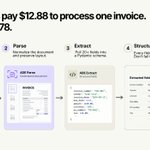
Most companies pay $12.88 to process one invoice. The best pay $2.78.
Almost none of that gap comes from better software. It comes from what happens between the invoice landing in an inbox and someone approving the payment.
The usual fix is a new AP suite, months of migration, and a bottleneck that survives all of it.
Format chaos is where most builds actually break. One vendor sends a clean PDF, another a photocopied scan, a third calls the same field Invoice #, Inv No. or Factura, and the template that handled the first two returns nothing on the third.
Agentic Document Extraction (ADE) handles it in two stages:
→ Parse normalizes the document, holds the layout
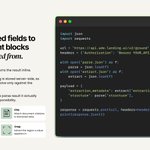
→ Extract pulls 20 plus fields into a Pydantic schema
Same invoice, either side of that, below.
Every field stays optional, which sounds like a small decision until extraction misses one and the whole pipeline takes down a night of processing instead of flagging a single document.
Then matching, where most AP automation quietly stalls.
An invoice matches a purchase order when the amount difference falls inside $1 absolute or 2% relative, whichever is larger. Two thresholds, because one fails both ways. Rounding kills the small invoices, shipping adjustments kill the large ones.
Full write-up in the comments.

Blog: landing.ai/blog/accounts-pay…
GitHub: github.com/invst-git/tmc-v1

Most document tools make you build it twice.
Once in a UI, once again in code.
Agentic Document Extraction (ADE) Parse runs both ways, and the configuration carries across. What you tick in the ADE Visual Playground is what you send in the call.
The walkthrough proves it on one hard document, a lab report carrying QR codes, barcodes, complex tables and signatures.
In the Playground:
- Select DPT-3 Pro, upload the file
- Uncheck marginalia, logos, scan codes, cards
- Keep tables set to HTML
- Parse, then open the JSON view
Through the API:
- Copy the starter command from docs
- Set the same blocks to false
- Execute, read the same JSON back
Same response either way. Structured Markdown, the document hierarchy, the metadata, and grounding on every block so each value traces to where it appears.
The Playground is where you find the configuration. The API is where you run it a million times. Nothing gets rebuilt in between.
Try it at ade.landing.ai
Your extraction returns the right value. It cannot tell you where that value came from.
ADE Ground fixes that.
Agentic Document Extraction (ADE) Ground takes the extraction_metadata from ADE Extract and the structure tree from ADE Parse. It returns every field mapped to the blocks it was quoted from, each with a block id, a page number, and a bounding box.
Load parse.json, load extract.json, POST both.
The join is stateless and deterministic. And it runs synchronously and consumes no credits.
Four things that become possible:
➡️ Highlight values on a rendering of the page
➡️ Build review interfaces where a person clicks a field and sees its source
➡️ Attach citations to extracted data
➡️ Crop the region a value appears in
A field comes back null when nothing in the document was quoted for it. The model synthesized the value or found nothing.
Want to learn more? Docs link in the comments.

More about ADE Ground: docs.landing.ai/api-referenc…

We asked the LandingAI team what stood out in the Agentic Document Extraction (ADE) Second Generation launch.
For Fatima, our Product Manager, it was the evaluations.
They rarely get talked about, but they decide whether the data you extract is correct.
The team ran them countless times while building the model. Machine learning engineers, labelers, and product went through results by hand to verify and improve them.
That manual work is why the accuracy holds on real documents.
Watch the full clip on YouTube: youtube.com/watch?v=z_OQALkV…

We asked Matias Cuenca-Acuna, Sr. Principal Engineer, what part of Agentic Document Extraction (ADE) Second Generation he thinks is genuinely best-in-class.
He picked how it handles layout.
Documents carry structure that people read naturally, and most OCR flattens that structure into plain text.
ADE 2nd Gen maps where information actually sits on the page, so the output keeps the shape the document always had.
You catch this faster on a real document than in any description of it.
Watch the clip on YouTube: youtube.com/watch?v=wKpgV4Lf…

We asked the LandingAI team what they think about Agentic Document Extraction (ADE) Second Generation.
Document grounding came up most.
ADE Second Generation reads a document hierarchically, from a section to a paragraph to a line to a single value. That granularity is what makes citations precise.
One bounding box per rendered line lets you trace any value back to its exact spot on the page.
For regulated teams, that changes the review loop. One healthcare customer runs millions of documents a month, with 70 to 80 people verifying results by hand.
Cost came up next.
Customers now pick a service tier, and DPT-3 Verity brings high accuracy to simpler documents without the full agentic cost.
The team also pointed to the work customers never see. Evals, checkbox accuracy, and the distance between a prototype and a production stack.
Full clips from the team in the comments.

Team Stories about ADE Gen2: landing.ai/blog/agentic-docu…
