

@hypertune_
🇺🇸Account based in
About this account
- Account based in
- United States
- Connected via
- Web
Account-level information from X, not a live location or the device used for a specific post.





HYPERTUNE retweeted

To add on if you're still experiencing issues, your GPU driver could also be the issue.
I'd recommend using DDU to completely remove your current driver, then reinstalling and trying the same or slightly newer driver version.
Use the settings shown below and make sure you've selected the correct GPU manufacturer on the right, as DDU can sometimes default to your iGPU.
- Avoid the latest NVIDIA driver 621.01 for now due to a lot of reported issues


🚨 NVIDIA Users
NVIDIA recently added a FASTER DLSS Frame Generation mode
Here's how to try it ⬇️
1. Open NVIDIA App → Settings → About
2. Enable “Opt in to access Beta or experimental features”
3. Go to Graphics → your game → Driver Settings
4. DLSS Override → Model Presets → Custom → Frame Generation → Preset C


If you want the best settings for FPS and performance, then you need to be using Hypertune 🤝 Hypertune users see up to 60% boosts in FPS, lower latency, fewer stutters, everything good. Hypertune's currently 50% OFF right now! hptn.gg/twitter

🚨 NVIDIA Users
Your NVIDIA app might have an UNWANTED AI feature with permissive rights ENABLED by default after a recent update
Here’s how to check and disable it ⬇️
1. Open your NVIDIA app
2. Go to Settings > Features
3. Look for the AI Agent Control toggle under AI Agents and App Connections
4. Turn it OFF


If you want the best settings for FPS and performance, then you need to be using Hypertune 🤝 Hypertune users see up to 60% boosts in FPS, lower latency, fewer stutters, everything good. Hypertune's currently 50% OFF right now! hptn.gg/twitter
HYPERTUNE retweeted

🌸 Yuki Aim Giveaway 🌸
✧ 3x Yuki Aim x Pulsar - Superglide 3
✧ 7x 30-day Hypertune PC optimization licenses
To Enter:
1️⃣ Follow @YukiAim @hypertune_
2️⃣ Like + Repost
3️⃣ Tag 2 friends in the replies.
🏆 5 Winners.
🗓️ Ends 11/04


If you want the best settings for FPS and performance, then you need to be using Hypertune 🤝 Hypertune users see up to 60% boosts in FPS, lower latency, fewer stutters, everything good. Hypertune's currently 50% OFF right now! hptn.gg/twitter

If you want the best settings for FPS and performance, then you need to be using Hypertune 🤝 Hypertune users see up to 60% boosts in FPS, lower latency, fewer stutters, everything good. Hypertune's currently 50% OFF right now! hptn.gg/twitter

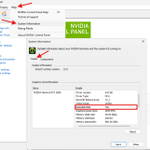
Notes:
1. If you have an RTX 30 Series GPU or newer, this is worth checking.
2. If you're on an older AM4/Intel board, check Above 4G Decoding is enabled, or else you might not have Re-Size BAR Support.
🚨This is the type of fix Hypertune applies automatically.
🎯Users see up to 60% boosts in FPS
🎯Partnered with Intel & AMD
🎯Custom NVIDIA Profile, Windows Debloating, Game Profiles, and more.
⬇️ Download Hypertune here ⬇️ hptn.gg/twitter
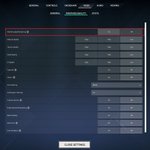
🚨 Deadlock Players
Here are the BEST settings to keep FPS smooth in teamfights⬇️
First, Open Settings → Video → Display
1. Turn on Custom resolution, set Window mode to Full Screen
2. Scroll to Performance and turn on Advanced settings
3. Set NVIDIA DLSS (RTX cards only), Scaling mode Auto, DLSS Model CNN
4. Match the boxed settings in the screenshot
5. Scroll down to Options, keep NVIDIA Reflex on Enabled


🚨For even more FPS, you need to be using Hypertune
🎯Users see up to 60% boosts in FPS
🎯Partnered with Intel & AMD
🎯Custom NVIDIA Profile, Windows Debloating, Game Profiles, and more.
Download Hypertune here ⬇️ hptn.gg/twitter
- Level through 5 new tiers of PC optimization📈
- Hypertune Yuki Aim App Theme ⛩️
- 5 New Game Profiles 🎯 (Kovaak's, Apex Legends, Deadlock, AimLabs, Rainbow Six Siege)
- Advancements in CPU Overclocking⚙️
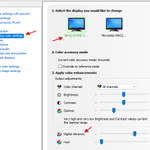
🚨 NVIDIA Users
Does your display look WASHED OUT? Digital Vibrance may have RESET to 50%
Here’s the fix ⬇️
1. Open NVIDIA Control Panel
2. Go to Adjust desktop color settings
3. Select your main display and check Digital Vibrance
4. If it’s back at 50%, raise it above 50% to your preferred level

If you want the best settings for FPS and performance, then you need to be using Hypertune 🤝 Hypertune users see up to 60% boosts in FPS, lower latency, fewer stutters, everything good. Hypertune's currently 50% OFF right now! hptn.gg/twitter