

Discover geospatial datasets and tools, AI capabilities, and planetary-scale insights from Google Earth, Google Earth Engine and Google Maps Platform
Mountain View, CA
Joined April 2009
- Tweets4.2K
- Following286
- Followers1.1M
- Likes2.9K





Pinned Tweet
Prepare for takeoff. ✈️ Flight simulator is now available globally on web to all users. goo.gle/4fBYnWO
We've recently added many our most powerful professional desktop features to web. Elevation profiles, new import types, but there's always been one other feature you've been asking us to add to the web version of Google Earth, just for fun...
Where will you fly? Share your best maneuvers, views, and flyovers with us!
One ridge or tall roofline between two points can block a wireless link or leave a blind spot on a site: goo.gle/4zDz25D
In Poland, cybersecurity professional Jacek Hojan uses 3D imagery, elevation profiles, and measurement tools in Google Earth to check structure heights and terrain clearance before scheduling a field visit:
"Google Earth allows me to assess object heights and analyze lines of sight remotely, saving the time and expense of a physical site visit. Whether I'm assessing wireless signal ranges or identifying key areas of interest for safety or cybersecurity risks, I get the critical spatial context I need to make decisions right from my desk."
- Jacek Hojan, Cybersecurity Professional
See how steep a lot gets and how much dirt has to move before you price the grading: goo.gle/4y7vtTW
Outline a parcel in Google Earth to map slope down to 1-meter resolution, then run cut and fill to check the excavation and fill volumes needed to level the site from your desk.
Price site work from your desk before rolling a truck to the property with new tools from Google Earth. goo.gle/4yzqlsK
"Google Earth helps us save time and win project bids because we don't need to be on-site to build an accurate quote. Combining imagery with site assessment tools allows us to move faster, better serve our customers, and remotely assess sites for field work at large commercial properties."
- JR Madrid, President, Custom Scapes
Quoting grading or maintenance across sites usually requires sending someone out just to scope the bid.
When three landslides shut down critical access roads in Colombia, geotechnical civil engineer Alex Cuellar Díaz evaluated 45 km² in Google Earth to focus fieldwork on the highest-risk 7% of the terrain. goo.gle/3W2mkyz
Instead of sending crews across 45 square kilometers of rugged ground blind, Alex imported project boundaries and regional geological records into a Google Earth map project. He combined elevation contours, land cover data, slope , and checked historical imagery for erosion to build a shareable hazard map from his desk:
"By combining Google Earth's imagery, data, and tools with my own data, we could select our sites strategically and target field visits strictly to where they were needed. Google Earth allowed me to analyze my site, understand terrain, and tell a clear story with my findings."

ALT An image depicting a landslide.
Google Earth has not 3... not 4... but 5 new site analysis tools! Learn how to take advantage of all these new capabilities from Juan Francisco Saldarriaga on the Google Earth team. goo.gle/4z8N5zS
Assess terrain from your desk with four new tools in Google Earth. goo.gle/3VWSjQF
Terrain decides where sunlight hits, how irrigation lines run, how steep an access road gets, and how much dirt has to move before anything gets planted or built. Using these tools is as easy as point-and-click:
🗺️ Elevation contours: See how the ground rises and falls with on-demand contour lines down to 1-meter intervals.
📐 Slope: Check how steep the land is at 1-meter resolution to plan access roads and building pads.
☀️ Aspect: See which way the slope faces to check sunlight exposure across your site.
⚖️ Cut and fill: Calculate how much dirt has to move so excavation matches fill and keeps hauling costs down.
These tools are available on all Google Earth plans. Standard allows you to generate one layer with a tool each month. Professional plans include expanded access and capabilities when you need more tools, a larger site, or both.
Learn more: goo.gle/4hR22AC
Learn how to analyze sites on Google Earth. goo.gle/4z35ZIk
New tools, data layers, and historical imagery can save you even more time in Google Earth. Learn how to take advantage of all these new capabilities from Juan Franisco Saldarriaga on the Google Earth team. At the end of this tutorial you leave with a complete site assessment using:
- New terrain tools
- Change detection
- Historical imagery
- Data layers
- and more!

ALT An image of the video summary of site analysis tools
Urban planner, Alejandra Macarena Tomietto, used Google Earth to plan the future of Buenos Aires. goo.gle/4cZepYM
Analyzing vast metropolitan areas to track urban expansion, infrastructure needs, and environmental risk, Alejandra mapped 2,567 square kilometers to protect 400,000 residents living in high environmental risk zones. She combined Google Earth's historical imagery with data layers to visualize development patterns and inform better planning decisions across the region:
"Google Earth helped us anticipate the future by showing real-world development patterns. By observing how these patterns were developing, we could predict where the city was expanding and identify open spaces available for services. It turned a mountain of abstract geographic data into a clear, visual language that we could actually use to plan effectively. We were tackling something deeply complex, and Google Earth made it feel easy."

ALT An image of Buenos Aires.
Learn how to use Google Earth's new change detection tool from the team that built it! goo.gle/4xL0fSr
By applying this new capability to site analysis, Juan Francisco Saldarriaga will teach you how to use the tool and combine it with historical imagery to save time at work.

ALT An image depicting change detection in Google Earth
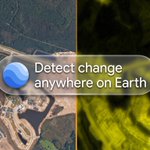
Detect where and when change happened, anywhere on Earth. goo.gle/4ygvCWf
Historical imagery already lets you travel through time and gives essential context for projects. But, finding change across time and space can feel like a needle in a haystack. With Google Earth's new tool, detecting change is as easy as point and click:
⚡ Activate the tool and see an instant preview.
📅 Pick two years and compare annual intervals between 2017 and 2025 across your area of interest.
✏️ Draw a polygon to get increased granularity from 40-meters to 10-meters and save the view to your project.
🔥 Read the heatmap to see where the planet changed.
🕰️ Dive into historical imagery and historical street view to inspect further and inform what tools or data layers you might need next!
Learn more: goo.gle/4yibD9w
Analyze sites with new tools in Google Earth. goo.gle/4j3kNSH
Every project starts with the same question: is this the right site? Now you can answer it in Google Earth, before resources are committed or field work begins.
• Detect change: See exactly where and when a site changed over time with a saveable heatmap.
• Terrain analysis tools: Evaluate elevation contours, slope, aspect, and cut and fill from your desk or the field, with point and click tools.
These tools are available on all Google Earth plans. Standard allows you to generate one layer with a tool each month. Professional plans include expanded access and capabilities when you need more tools, a larger site, or both.
Learn more: goo.gle/4y6x2Cl
Nobody knows your sites, land, and communities better than you do. goo.gle/4z4p6Sv
Now you can turn that local knowledge into custom map layers with the new classify tool in Google Earth on the web, in Experimental.
✏️ Draw your area: Outline a site, or select a polygon already in your map project. Pick a year, 2017 to 2025.
🗂️ Name your own classes: Define the categories your work depends on, from plant species and dry brush to cleared firebreaks.
📍 Label and iterate: Place sample points across your site. Google Earth reads every 10-meter square, fills in the rest, and sharpens as you add points. No code required.
📤 Share and export: Your custom layer lives in your map project, and you can download your work as a GeoJSON file for further analysis.
Google's leading geospatial models are now within reach for professionals who want to save time, or who never trained in geospatial coding.

Learn how to use Google Earth's imagery for work. goo.gle/4cO289o
Learn how to master all of Google Earth's different imagery types from Product Lead, Brian Ho.
• Navigate 3D imagery: Inspect building heights, structural clearances, and line-of-sight perspectives directly from your desk.
• Review historical imagery: Track environmental shifts using four decades of satellite baselines back to 1984 and aerial photography dating to the 1930s in select cities.
• Inspect street-level ground truth: Validate curb cuts, utilities, and road conditions across more than 280 billion Street View images.
Master professional Google Earth workflows.
Watch the complete tutorial with Product Lead Brian Ho. goo.gle/4j2T6cq
• Inspect 3D imagery: Examine site boundaries, structure heights, and sight lines directly on the real-world canvas.
• Add curated data layers: Overlay parcel boundaries, zoning regulations, and elevation models directly in your workspace.
• Assess terrain remotely: Run point-and-click tools for elevation profile, slope, cut and fill, and more.
• Delegate work to a geospatial agent: Learn how to work with Ask Google Earth.
Today we’re bringing AI image generation with Nano Banana to Google Earth, letting you virtually reimagine anywhere in the real world. 🍌 goo.gle/44SUsOP
For the first time, you can generate custom images using Google Earth’s satellite, aerial, and 3D imagery. 🌎
🎨 Ready to try it? We're launching a challenge.
Here’s how to play:
- Zoom into any place on Google Earth
- Tap “create image”
- Fill in the blanks of our prompt and paste into the text box
- Show us what you made
Your mission: create something beautiful, fun or simply helpful. Tag us. We’ll repost our favorites. #goBananas
Challenge 1: Pet Paradise or Habitat 🐶🐱
In Google Earth: zoom into a place and tap “create image.” Then paste in this prompt, fill in the blanks, and hit enter.
"Adapt this space as a luxurious, five-star animal resort with a large [Main Feature]. The structure is built from [Material]. Include my [pet type]."
Reply with your creation! #goBananas
Challenge 2: 📝Architecture & Real Estate Plans
In Google Earth web: zoom into a place and tap “create image.” Then paste in this prompt, fill in the blanks, and hit enter.
"Reimagine [Area of Interest] as a vibrant [Your Vision] made of [Material]. Show the scene in [Season] at [Time of Day] to give it a [Your Vibe] aesthetic.
Reply with your creation! #goBananas