

Server performance checker. Hosts’ uptime data. Host-hunting intelligence. Check out https://xitter.cf/t.co/liMsnVUZIQ for tips & tricks to build your website.
The Internet
Joined February 2015
- Tweets25.7K
- Following2.7K
- Followers3.9K
- Likes1.3K






Designing a website is essential for creating an effective online presence that attracts & engages visitors. Here are the 11 steps required to design a functional, visually appealing & user-friendly website.
bitcatcha.com/create-website…
#WebsiteDesign
#WebsiteDevelopment

1
112
Thinking to sell off your old stuff? Whatever you are selling, there will always be people buying - if you use the right platform to sell 😉
bitcatcha.com/blog/where-to-…
#ecommerce #smallbusinessowner #passiveincome
1
Weekends are here! 🙌🏽 It is the best time to rework your #sleep schedule from the long productive week.
bitcatcha.com/blog/tips-to-s…
#selfcare #Wellbeing

1
If you want to thrive and survive as a successful #freelancer, staying on top of your finances is as important as using the skills for the job you are working.
Learn more #budgeting tips here: bitcatcha.com/blog/budgeting…
Freelancing for friends and family, yay or nay?
bitcatcha.com/blog/freelance…
#FreelanceChat #freelancing #freelancers #freelance

1
Most of us experience self-doubt at some point in our lives. But, some of us doubt EVERY accomplishment, regardless of the blood, sweat and tears poured in.
So, how exactly do we combat these pesky demons in our heads?
bitcatcha.com/blog/beat-free…
How many times have you tried to take a break from work, only to end up scrolling emails or social media and feeling even more drained?
Yeah, let’s fix that. Read more on the art of disconnecting
bitcatcha.com/blog/how-to-un…
#selfcare #TakeCare #freelancer #freelance #work

Picking the right colour scheme for your brand can be quite a headache. After all, those colours are going to represent the brand. Here are the 4 most important steps to determine a good website colour scheme.
#freelancer #websitedesign #colours #colourpalette
Cyber Monday 2021 is here! Get extra % OFF from the web hosting deals
bitcatcha.com/research/black…
#Webhosting #Deals #CyberMonday #cybermondaysale #CyberMonday2021

Black Friday deals are still ongoing! Don't miss them, some are ending today!
bitcatcha.com/black-friday-c…
#BlackFriday #BlackFridayDeals #CyberMonday

Black Friday 2021 is coming right up, which means now’s the PERFECT time to get @Grammarly Premium for yourself!
bitcatcha.com/blog/grammarly…
#Grammarly
Hustle, but don't neglect your well-being! We just published our new entity "Well-being". From mindfulness and sleep, to exercise and work-life balance. Here're our best tips for feeling your best self in the modern age.
#freelancer #wellbeing
Why wait for Black Friday when you can enjoy the deals now? We have gathered Megalists on web hosting, VPNs, Cloud storage, printers, mechanical keyboards, you name it! Check out all the deals here!
bitcatcha.com/black-friday-c…
1
1. Pick the perfect keywords so Google can find you
2. Choose a keyword or phrase that actually sells
3. Place those keywords in all the right places
4. Connect your pages and content with internal links
You’re Done! Congratulations on your new store!
Consider reading 11 Shopify Features that you will find useful for your store
bitcatcha.com/blog/shopify-f…
#freelance #smallbusiness

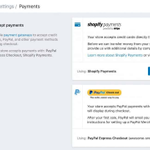
1⃣1⃣ Add your payment mechanism, so you can make money!
For many, the simplest option is Paypal, but you can also choose ‘Shopify Payments’ which allows you to accept credit cards directly (without using PayPal as a middle man).

1
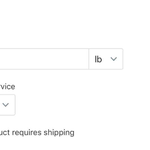
🔟 Step 10. Enter product weight for shipping purposes
Shopify will attempt to calculate a rough shipping price based on the customer’s location and the weight of your product.

1
9⃣ Step 9: Set your price and inventory
Enter the price of your product and be sure to tick the ‘charge taxes’ box-Shopify will automatically add the correct sales tax based on your location.
Enter an ‘SKU’ (stock-keeping unit) which is simply a number to identify each product.

1
